NetSuite ERP Optimization Checklist for CFOs and Controllers
You did not buy NetSuite to keep reconciling in spreadsheets. Yet a year after go-live, that is often where Finance quietly ends up.
The close that took three days now takes five. A report will not tie to the general ledger until an analyst rebuilds it. A new subsidiary added manual work instead of absorbing cleanly. None of this triggers an error message, so no one calls it a problem. It just becomes the new normal.
That drift is what businesses lose when NetSuite ERP is never optimized: close speed, reporting confidence, control, and the return on the platform they already paid for.
Optimizing NetSuite ERP is not merely a one-time task; rather, it should be approached as an ongoing process. Continuous optimization is essential to fully leverage the features and capabilities of NetSuite, ensuring that the system evolves alongside your business needs.
This NetSuite ERP optimization checklist gives CFOs and Controllers a way to catch that erosion before year-end does it for them.
Why does NetSuite need optimization after go-live?
NetSuite ERP Implementation gets you live. It does not keep you optimized, which is exactly why a NetSuite ERP optimization checklist belongs on the finance leader’s calendar.
ERP Go-live reflects the business as it existed on day one, including the scope compromises and the “we will fix it later” items that never got fixed.
Then reality diverges. New entities, channels, products, and people arrive, but the configuration still assumes the old shape of the company.
Transaction volume climbs, so searches, reports, and the close that felt fast at 10,000 records a month strain at 50,000. Eventually, the initial procedures, triggers, speed, and accuracy will become obsolete or legacy after 6 or 12 months of implementation.
Meanwhile, workflows, saved searches, and workarounds accumulate. Technical debt compounds quarter over quarter, so a two-hour fix today becomes a full remediation project in six months once other processes depend on the broken pattern.
Optimization protects the ROI already spent. Without it, an unoptimized ERP slowly pushes Finance back into the spreadsheets NetSuite was bought to eliminate.
A regular NetSuite ERP optimization approach helps leadership track the gap between expected business performance and real-time deliverables.
What stalls scaling 6 to 12 months after go-live?
Growth does not break NetSuite ERP performance. It exposes the shortcuts taken at go-live. Between month six and month twelve, the same stall points appear across finance teams:
Data debt
Duplicate and dirty master data, plus unarchived history, slow reports, and the close.
Process debt
Finance processes were never redesigned for the larger business, so manual journals multiply.
Workflow sprawl
Obsolete workflows keep firing, and dashboard searches time out. The business changed; the automations did not.
Integration fragility
As order volume rises, CRM and e-commerce sync errors, duplicate customers, and failed orders increase.
Consolidation strain
New subsidiaries and currencies are added without governance, so intercompany and eliminations stay manual.
No ownership
With no clear NetSuite owner, the enhancement backlog grows, and small problems go unfixed for weeks.
The pattern is consistent: the day-one setup no longer fits, and Finance becomes the bottleneck to growth. Running a NetSuite ERP optimization check at this stage keeps small inefficiencies from hardening into permanent overhead.
What challenges do CFOs and Controllers face when they overlook optimization?
The operational friction above lands squarely on the finance desk, at two different altitudes.
The Controller lives in the daily reconciliations, journals, and tie-outs.
The CFO lives in the executive consequence.
Both feel the same neglect, and a NetSuite ERP optimization is what separates the teams that catch it early from the ones that discover it at year-end.
| Neglected area |
What Finance experiences | CFO and Controller impact |
|---|---|---|
| Close | Manual cleanup every period | Slower, less predictable close |
| Reporting | Dashboards rebuilt in Excel | Numbers questioned, decisions delayed |
| Controls | Adjustments live outside NetSuite | Weaker traceability, heavier audit prep |
| Cash | Fragmented AR and customer data | Unreliable aging and cash forecasts |
| Scale | Each new entity adds manual work | Finance limits growth instead of enabling it |
There is also a quieter risk. When one person is the only one who knows the workaround, their departure resets the team. A NetSuite ERP optimization checklist makes this neglect visible before it turns institutional knowledge into key-person risk.
Explore Amzur’s NetSuite integration services.
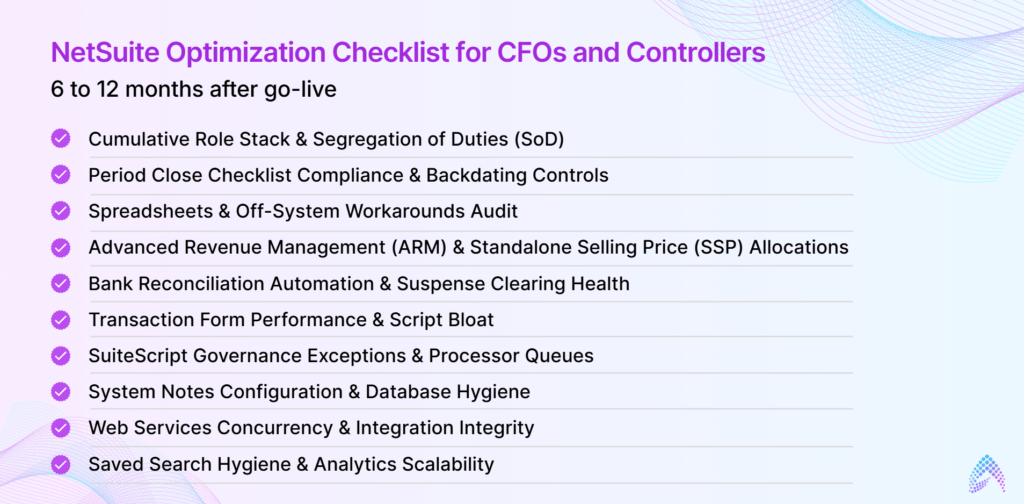
NetSuite Optimization Checklist for CFOs and Controllers: 6 to 12 months after go-live
At the 6-to-12-month post-go-live milestone, an organization transitions from initial adoption and hypercare into long-term operational scale. During this window, initial implementation shortcuts, untracked customizations, and expanding transaction volumes begin creating operational friction.
The following comprehensive optimization checklist is structured for CFOs, Controllers, and Finance Directors to audit, remediate, and optimize their NetSuite environment.
1. Cumulative Role Stack & Segregation of Duties (SoD)
At the 6-to-12-month post-go-live milestone, an organization transitions from initial adoption and hypercare into long-term operational scale. During this window, initial implementation shortcuts, untracked customizations, and expanding transaction volumes begin creating operational friction.
The following comprehensive optimization checklist is structured for CFOs, Controllers, and Finance Directors to audit, remediate, and optimize their NetSuite environment.
What to Inspect
User permissions evaluated across all assigned roles simultaneously, rather than evaluating individual roles in isolation.
Red Flags
- Employees accumulating toxic permission pairs through secondary or temporary roles (e.g., an AP specialist who can both edit vendor master records and generate bill payments, or an AR clerk who can create invoices and issue credit memos).
- Former employees or inactive contractors retaining active NetSuite logins.
- More than 2 to 3 internal users holding the native System Administrator role.
Executive Action
Run a cross-role permission matrix audit every quarter or half-year. Deactivate redundant roles, enforce the principle of least privilege, and mandate that all administrative changes and CSV imports be subject to segregation rules.
2. Period Close Checklist Compliance & Backdating Controls
Cross-role assignments of the elevated Override Period Restrictions permission.
Red Flags
- Accounting teams using the “Quick Close” shortcut or skipping subledger lock steps (Lock AR, Lock AP, Lock All).
- Multiple accounting users possessing the Override Period Restrictions permission, leading to retroactive adjustments in previously reported periods.
- Persistent “Date/Period Mismatch” warnings where the transaction calendar date conflicts with the general ledger posting period.
Executive Action
3. Spreadsheets & Off-System Workarounds Audit
What to Inspect
The volume of balance sheet reconciliations, revenue schedules, and accrual calculations performed in Microsoft Excel rather than native NetSuite records.
Red Flags
- Staff accountants regularly exporting raw general ledger tables to calculate deferred revenue waterfalls, contract modifications, or multi-currency consolidations in external workbooks.
- A rising count of manual, multi-line journal entries required at month-end to correct system-generated figures.
Executive Action
Identify where changing commercial models (such as usage pricing, bundled discounts, or multi-element arrangements) have outpaced the initial go-live configuration. Re-configure Advanced Revenue Management (ARM) rules or consider purpose-built billing extensions (e.g., ZoneBilling) to bring calculations back inside the ERP.
4. Advanced Revenue Management (ARM) & Standalone Selling Price (SSP) Allocations
What to Inspect
The alignment between customer contract changes and automated revenue schedules under ASC 606 / IFRS 15.
Red Flags
- Revenue Arrangements and Revenue Elements failing to trigger automatically upon Sales Order approval or contract execution.
- Standalone Selling Price (SSP) tables and Fair Value Price Lists that have not been recalibrated against actual commercial discounting over the prior 12 months.
- Discrepancies between the native Deferred Revenue waterfall report and the general ledger balance sheet balance.
Executive Action
Execute the automated Recognize Revenue and Reclassify Revenue jobs systematically during the close. Conduct a bi-annual review of fair-value allocation formulas with external auditors.
5. Bank Reconciliation Automation & Suspense Clearing Health
What to Inspect
The clearing percentage and throughput of NetSuite’s Advanced Bank Reconciliation (ABR) engine.
Red Flags
- Auto-matching rates falling below 80% to 90%, forcing accounting clerks into manual line-by-line statement matching.
- Undeposited funds, payment clearing accounts, or payroll suspense accounts accumulating aged, unreconciled balances.
Executive Action
Transition from monthly statement uploads to automated daily feeds (via BAI2, CAMT.053, or banking APIs). Calibrate deterministic matching rules (e.g., matching on check number, exact amount, and a 3-day transaction window) to eliminate close-week reconciliations.
6. Transaction Form Performance & Script Bloat
What to Inspect
Average page load latency across primary transaction entry screens (Invoices, Sales Orders, Vendor Bills).
Red Flags
- Browser page load times consistently exceeding 5 seconds.
- Double-clicking the NetSuite logo reveals that Server Script Time consumes greater than 50% of the total page load duration.
- Overlapping User Event scripts, Client scripts, and SuiteFlow workflows running redundant validations across the same record events (beforeLoad, beforeSubmit).
Executive Action
Direct technical administrators to audit and consolidate competing scripts. Retire client scripts that execute on non-essential fields and convert complex synchronous logic into asynchronous background processing.
7. SuiteScript Governance Exceptions & Processor Queues
What to Inspect
The Script Execution Log (Customization > Scripting > Script Execution Log) and the SuiteCloud Processors Monitor.
Red Flags
- Recurrent SSS_USAGE_LIMIT_EXCEEDED error codes causing background jobs (such as auto-invoicing, billing batches, or payment processing) to terminate abruptly.
- Batch processor queues displaying a “Pending” status for hours during standard operating hours.
- Persistence of legacy SuiteScript 1.0 scheduled scripts that block compute threads without yielding resources.
Executive Action
Refactor high-governance SuiteScript 1.0 logic into modular SuiteScript 2.1 Map/Reduce scripts that yield processing units dynamically. Reschedule heavy batch processing runs to off-peak hours (between 2:00 AM and 6:00 AM).
8. System Notes Configuration & Database Hygiene
What to Inspect
Red Flags
- “Track Changes” enabled on non-financial or high-frequency transient fields (e.g., internal memos, system-generated status codes, description lines), generating millions of unnecessary rows.
- User interface lag and database timeouts triggered by excessive audit trail overhead on transaction records.
Executive Action
Limit change tracking strictly to compliance-critical fields: Transaction Amount, Account, Approval Status, Posting Period, Entity, and Vendor Bank Details. Implement a formal data retention and archiving policy for system notes older than the mandatory statutory audit window (typically 7 years).
9. Web Services Concurrency & Integration Integrity
What to Inspect
Integration logs in middleware platforms (Celigo, Boomi, MuleSoft) and NetSuite’s Web Services Usage Log.
Red Flags
- Integration failures triggering CONCURRENT_REQUEST_LIMIT and HTTP 500 error spikes during high-volume sales periods.
- External connectors (CRM, e-commerce, banking) authenticating via shared System Administrator credentials rather than dedicated integration service accounts.
- Relational “record locking” errors occurring when concurrent API payloads attempt to modify child lines belonging to the same parent customer, inventory item, or account simultaneously.
Executive Action
Modernize all endpoints to JSON-based REST APIs or RESTlets utilizing Token-Based Authentication (TBA / OAuth 2.0) with restricted, role-specific permissions. Ensure integration pipelines incorporate exponential backoff retry logic and queue serialization to smooth peak concurrency demands.
10. Saved Search Hygiene & Analytics Scalability
What to Inspect
Red Flags
- Dashboards timing out or taking more than 10 seconds to render KPI portlets.
- Between 15% and 30% of system saved searches sitting unused for over 180 days.
- Searches running complex, unindexed calculations via non-stored formula fields across millions of historical transaction rows.
Executive Action
Purge or archive dormant searches and standardize dashboard KPIs across departments. Convert non-stored formula fields to Store Value fields to pre-index values at transaction save. For intensive multi-year reporting or predictive modeling, export transactional data via SuiteAnalytics Connect (ODBC) to a dedicated data warehouse (e.g., Snowflake, BigQuery) rather than running deep queries directly on the live production ERP.

Go-live is not the finish line. It is the end of the introduction and the start of Chapter One. The business you configured NetSuite for on day one is not the business you will run twelve months later, and an ERP that does not evolve with you quietly stops earning its ROI. Optimizing every 6 to 12 months is not mandatory, but it is essential to protecting the long-term value of the platform.
– Serghino Felix
What does an optimized NetSuite look like for Finance?
A healthy state is recognizable. The close follows a predictable timetable. Material accounts reconcile with fewer recurring exceptions. Manual adjustments decline and stay inside the control environment.
Management receives reliable numbers earlier, and variances can be explained without rebuilding the analysis outside NetSuite. New entities and channels onboard without breaking reporting.
The platform behaves like the system of record it was meant to be. That is the state a disciplined NetSuite ERP optimization checklist is built to move Finance toward.
Check out our NetSuite ERP consulting services for SMBs
The bottom line for finance leaders
A close problem that reappears every period is no longer a close problem. It is a finance operating-model issue. The goal is not to make the team work faster around the same friction. It is to stop accepting that friction as normal, and a recurring NetSuite ERP optimization checklist is where that discipline starts.
Amzur Technologies has spent more than two decades implementing, optimizing, and supporting NetSuite ERP for SMBs and growing businesses. We treat optimization as a finance priority, tuning data, configuration, process, and adoption so the platform keeps pace with the business.
Take the next step
Run the Amzur NetSuite Performance Health Check. We work through your NetSuite ERP optimization with you, pinpoint where drift is slowing your close and clouding your reporting, and map the fixes that restore trusted numbers before year-end.
Frequently Asked Questions
How often should you optimize NetSuite after go-live?
Run a review every 6 to 12 months for stable mid-market environments, and quarterly for high-growth companies adding entities or channels. Any major change, such as an acquisition or new integration, warrants its own focused audit.
Why does NetSuite slow down after implementation?
Go-live reflects the business as it was on day one. As transaction volume grows and workflows, searches, and workarounds accumulate, technical debt compounds and both the close and reporting slow down.
What are the warning signs NetSuite needs optimization?
Watch for a close that lengthens each quarter, reports rebuilt in Excel, recurring manual journals, reconciliations throwing exceptions, and teams reverting to spreadsheets. Three or more means a review is overdue.
Is NetSuite optimization the same as re-implementation?
No. Optimization tunes existing data, configuration, process, and adoption, while re-implementation starts over. Most finance friction is resolved by optimization, not by replacing the system.

Author: Serghino Felix
Sr. Director – Enterprise Applications
Serghino Felix is a seasoned ERP professional with nearly two decades of experience in the enterprise applications space. Known for connecting strategy with execution, he has built a career around turning complex business challenges into scalable, practical solutions, while keeping people and outcomes at the center of every engagement. His expertise spans delivery leadership, customer partnership, and strengthening enterprise application practices that drive real business transformation.