M-Pesa ERP Integration: Automate Collections, Reconciliation, and Financial Reporting for Kenya Businesses
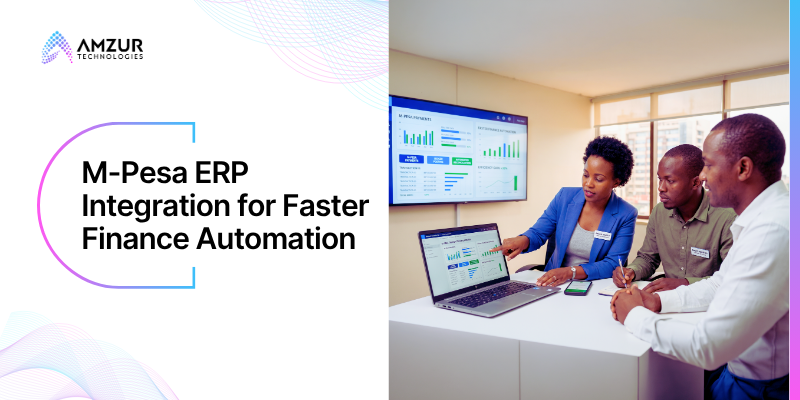
M-Pesa has transformed how businesses across Kenya collect payments. Customers can pay instantly, businesses receive funds within seconds, and cash collections have become faster than ever before.
Yet, for many growing businesses, one critical process remains surprisingly manual.
After the payment is received, finance teams still download M-Pesa statements, export CSV files, match payments against invoices, reconcile transactions, post journal entries, and update the ERP or accounting system manually. While collections happen in real time, accounting often lags behind by hours, or even days.
Why Finance Leaders Are Prioritizing Payment Automation
Finance leaders today are under increasing pressure to improve cash flow visibility, strengthen compliance, and reduce operational costs without expanding finance teams.
Manual reconciliation simply doesn’t scale.
Every hour spent downloading statements, matching invoices, or correcting reconciliation errors is an hour not spent analyzing profitability, forecasting cash flow, or supporting strategic business decisions.
This is why forward-looking businesses across Kenya are moving beyond payment collection and investing in M-Pesa ERP integration. By automating collections and reconciliation, organizations gain a single source of financial truth, reduce manual intervention, and build finance operations that are ready to support long-term growth.
More importantly, automation creates confidence. Finance teams trust their numbers, executives gain real-time visibility into business performance, and organizations can make faster decisions backed by accurate financial data instead of disconnected spreadsheets.
The Hidden Cost of Manual M-Pesa Reconciliation
Most businesses assume receiving payments quickly automatically improves financial operations.
It doesn’t.
Without M-Pesa ERP integration, the payment journey often stops at collection. Finance teams must manually bridge the gap between M-Pesa transactions and their ERP system.
A typical manual reconciliation process looks like this:

Every manual step introduces delays, duplicate work, and opportunities for error.
What appears to be a simple daily routine gradually becomes one of the biggest hidden productivity drains within finance departments.
Common Challenges Businesses Face Without M-Pesa ERP Integration
Manual matching of customer payments with invoices
Delayed visibility into daily collections and cash flow.
Duplicate data entry across spreadsheets and accounting systems
Reconciliation errors caused by missing or incorrect transaction references.
Slower month-end and year-end financial close.
Difficulty tracing transactions during audits.
Limited real-time visibility into receivables and outstanding payments.
Increased dependency on finance staff for repetitive administrative work.
As businesses expand, these challenges multiply. More customers, additional payment channels, and higher transaction volumes make manual reconciliation increasingly difficult to sustain.
Instead of enabling growth, disconnected payment and finance systems begin limiting operational efficiency.
Why M-Pesa and ERP Integration is Significant
1. Seamless eTIMS Tax Compliance
Every digital transaction must be accounted for accurately. By linking M-Pesa directly to your ERP, a successful customer payment instantly triggers the system to generate and transmit an eTIMS-compliant electronic tax invoice to the Kenya Revenue Authority (KRA). This removes the massive compliance risk of unrecorded mobile money sales.
Learn more about KRA eTIMS integration benefits
2. Elimination of Fraud and Manual Mistakes
Manually tracking payment text messages or cross-referencing the Safaricom portal invites human error and internal fraud. A direct integration ensures cashiers cannot accidentally (or intentionally) log an M-Pesa transaction as “cash,” nor can they be fooled by fake or forwarded SMS receipts. The ERP verifies the transaction ID programmatically before updating the ledger.
3. Automated, Real-Time Reconciliation
Instead of accountants spending days at the end of the month matching hundreds or thousands of Paybill and Till transactions to invoices, automation clears invoices the exact second money lands. What used to take days now takes seconds, giving business leaders clear, live visibility over cash flow.
4. Frictionless Customer Experience
Integrating STK Push (Lipa Na M-Pesa Online) changes the customer dynamic entirely. Rather than expecting a client to type in a multi-digit Paybill number and an account name, your system triggers a prompt directly onto their phone screen. They enter their PIN, the payment clears, and your ERP can instantly auto-dispatch goods or activate a digital service.
Manual Finance vs. Automated M-Pesa ERP Integration
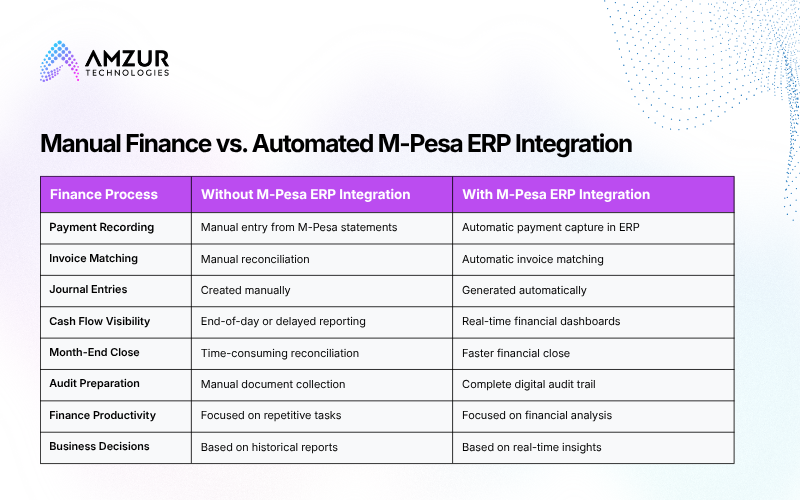
The difference is clear. While manual processes slow finance operations as businesses grow, M-Pesa ERP integration creates a connected financial ecosystem that improves accuracy, strengthens governance, and accelerates decision-making.
How M-Pesa ERP Integration Works: A Step-by-Step Guide
Implementing M-Pesa ERP integration isn’t just about connecting two systems, it’s about creating a seamless financial workflow where every payment automatically updates your accounting records, customer invoices, and financial reports. When implemented correctly, the integration eliminates manual reconciliation and provides finance teams with real-time visibility into collections.
Step 1: Assess Your Payment and Finance Workflows
Before integration begins, evaluate how payments currently flow through your business.
Questions to ask include:
- How are M-Pesa payments received today?
- How many transactions are processed daily?
- Are payments reconciled manually?
- How much time does the finance team spend matching payments with invoices?
- Are there multiple stores, branches, or business entities involved?
Understanding these workflows helps identify automation opportunities and ensures the integration aligns with your business processes.
Step 2: Connect M-Pesa with NetSuite ERP
Using secure APIs or an integration platform, M-Pesa payment data is connected directly to NetSuite ERP.
The integration captures:
- Customer payments
- Transaction IDs
- Payment references
- Payment status
- Refunds and reversals (where applicable)
Instead of downloading payment statements manually, transactions flow automatically into the ERP system as they occur.
The Automated Collection Workflow
When a customer pays, NetSuite handles the entry generation programmatically based on your business model:
B2B / Invoiced Clients
The customer pays via your Paybill number and types their Invoice Number (e.g., INV-10024) into the account field. When the M-Pesa payload lands, the script searches NetSuite for an open Invoice record matching that ID. It automatically creates a Customer Payment record, applies it directly to that specific invoice, and changes its status from Open to Paid.
B2C / Retail / E-commerce
If using STK Push at checkout or a retail counter, the payment is directly linked to a transaction ID initiated by NetSuite. The system automatically generates a Cash Sale record, bypasses accounts receivable entirely, and deposits the funds straight into a designated M-Pesa clearing asset account.
Step 3: Map Payments to Financial Records
The next step is configuring business rules that tell NetSuite how to process incoming payments.
For example, the integration can automatically map payments to:
- Customer accounts
- Sales invoices
- Branch or store locations
- Business units
- Cost centres
- General Ledger (GL) accounts
- Tax codes
This ensures every transaction is recorded consistently and accurately.
Explore our expert opinion on how NetSuite ERP contributes to growth and profitability.
Step 4: Automate Collections and Reconciliation
This is where M-Pesa ERP integration delivers the greatest business value.
As payments are received:
- Customer invoices are automatically updated.
- Open invoices are matched against incoming payments.
- Exceptions are flagged for finance review.
- Journal entries are generated automatically.
- Customer ledgers remain up to date.
Instead of spending hours reconciling transactions, finance teams simply review exceptions while routine reconciliation happens automatically.
NetSuite ERP Matching Rules Configuration:
Inside NetSuite’s Match Bank Data module, you configure rules that instruct the system exactly how to clear the statements. For instance, you can set a 1-to-1 Match Rule:
Criterion 1
The M-Pesa Receipt Number in the imported Safaricom statement must exactly match the External ID field on the NetSuite Customer Payment record.
Criterion 2
The transaction amounts must match.
When these conditions are satisfied, NetSuite auto-clears the transaction. The accounting team is left to look only at the Exceptions Dashboard, handling rare anomalies such as customer overpayments or network timeouts during a callback.
Step 5: Generate Real-Time Financial Insights
Once collections and reconciliation are automated, NetSuite provides real-time dashboards that help finance leaders monitor:
- Daily collections
- Outstanding receivables
- Cash flow
- Revenue by branch
- Payment trends
- Customer balances
- Financial performance
With live financial visibility, business leaders can make informed decisions without waiting for manual reports.
Why NetSuite Is the Ideal ERP for M-Pesa Integration
While several ERP platforms support payment integrations, NetSuite ERP implementation for Kenya SMBs stands out because it combines financial management, automation, and reporting within a single cloud platform. Rather than simply recording transactions, it automates the entire order-to-cash process, helping finance teams reduce manual work while improving accuracy and compliance.
Some of the capabilities that make NetSuite an ideal platform for M-Pesa ERP integration include:
Automated Payment Reconciliation
Matches M-Pesa payments with invoices and updates customer ledgers automatically.
Real-Time Financial Reporting
Provides live dashboards for collections, receivables, cash flow, and business performance.
Workflow Automation
Automates approvals, notifications, journal entries, and finance processes using configurable workflows.
Complete Audit Trails
Records every payment, approval, and system activity to support audit readiness and financial governance.
Scalable Cloud Architecture
Supports multi-branch, multi-entity, and multi-currency operations as businesses grow.
Together, these capabilities help businesses move from reactive financial management to proactive decision-making.
Accounting Automation in Action: Amzur’s Success Story
Problem:
A leading coffee retailer with 15 locations and over 800 wholesale customers struggled with manual reconciliation between its POS system and NetSuite. Finance teams spent hours matching transactions, updating records, and preparing reports, slowing month-end close and reducing productivity.
Solution:
Amzur Technologies implemented a customized NetSuite ERP integration that automated the flow of sales and payment data into NetSuite. The solution eliminated manual data entry, streamlined accounting workflows, and centralized financial information across all retail locations.
Business Outcomes:
- Reduced reconciliation effort by 60% through accounting process automation.
- Eliminated manual data entry and improved financial reporting accuracy.
- Enabled real-time visibility into sales, cash flow, and inventory.
- Freed finance teams to focus on analysis and strategic decision-making instead of repetitive reconciliation.
Although this project focused on POS integration, the same automation principles apply to M-Pesa ERP integration. Whether payment data originates from retail stores, mobile money transactions, or other digital payment channels, integrating it directly with NetSuite enables businesses to automate collections, simplify reconciliation, and strengthen financial governance.
What’s Next For Your Business Finance Automation?
M-Pesa ERP integration eliminates process inefficiencies by connecting collections directly with finance. Payments are automatically captured, invoices reconciled, journals updated, and financial reports generated in real time, allowing finance teams to focus on strategic planning instead of administrative work.
At Amzur Technologies, we help SMBs and growth-stage businesses across Kenya modernize finance through secure Cloud ERP solutions and tailored NetSuite ERP solutions. From M-Pesa integration and accounting process automation to NetSuite implementation, customization, and ongoing optimization, our consultants help organizations build connected finance ecosystems that improve cash flow visibility, accelerate financial close, strengthen compliance, and support sustainable business growth.
If your finance team is still reconciling M-Pesa transactions manually, it may be time to modernize your payment and finance operations with an integrated Cloud ERP platform.
Frequently Asked Questions
How does NetSuite handle M-Pesa transaction fees during automated reconciliation?
The integration script or middleware can be configured to automatically split the incoming Safaricom payload. Instead of just posting the net amount received, the system records the gross payment from the customer (ensuring the invoice is fully cleared) and concurrently generates a ledger entry debiting a designated “Safaricom Service Fees” expense account. This keeps your accounts receivable clean and ensures your NetSuite asset ledger matches your Safaricom corporate statement perfectly.
What happens if a customer inputs the wrong Invoice Number into the M-Pesa account field?
This is handled via an Exception Workstream. When a payload arrives with an unrecognized account reference, the NetSuite matching engine isolates the transaction. Instead of failing or rejecting the cash, the system logs the money as an “Unapplied Customer Payment” and routes it to a specialized finance dashboard. The accounting team can then review the phone number or sender name, manually match it to the correct invoice, and clear the exception with a single click.
Do we need a special Oracle NetSuite license or module to integrate M-Pesa?
No, Oracle does not sell a native M-Pesa module. To build the integration, you simply need access to NetSuite’s standard development and integration tools—specifically SuiteScript (RESTlets) or SuiteTalk (Web Services), which are standard components of the platform. Alternatively, if you choose the middleware route, you will need a subscription to an integration platform (iPaaS) like Celigo or Workato that supports webhook ingestion and NetSuite API mapping.
How does NetSuite and M-Pesa integration support KRA eTIMS compliance?
The integration turns tax compliance into a background process. The exact millisecond NetSuite receives the M-Pesa payment confirmation and generates a Cash Sale or clears an Invoice, a secondary workflow triggers a call to Kenya Revenue Authority’s (KRA) eTIMS validation servers. NetSuite transmits the required transactional and tax data, fetches the KRA control number and QR code, and appends them to the electronic receipt automatically before emailing it to the customer.

Author: Serghino Felix
Sr. Director – Enterprise Applications
Serghino Felix is a seasoned ERP professional with nearly two decades of experience in the enterprise applications space. Known for connecting strategy with execution, he has built a career around turning complex business challenges into scalable, practical solutions, while keeping people and outcomes at the center of every engagement. His expertise spans delivery leadership, customer partnership, and strengthening enterprise application practices that drive real business transformation.